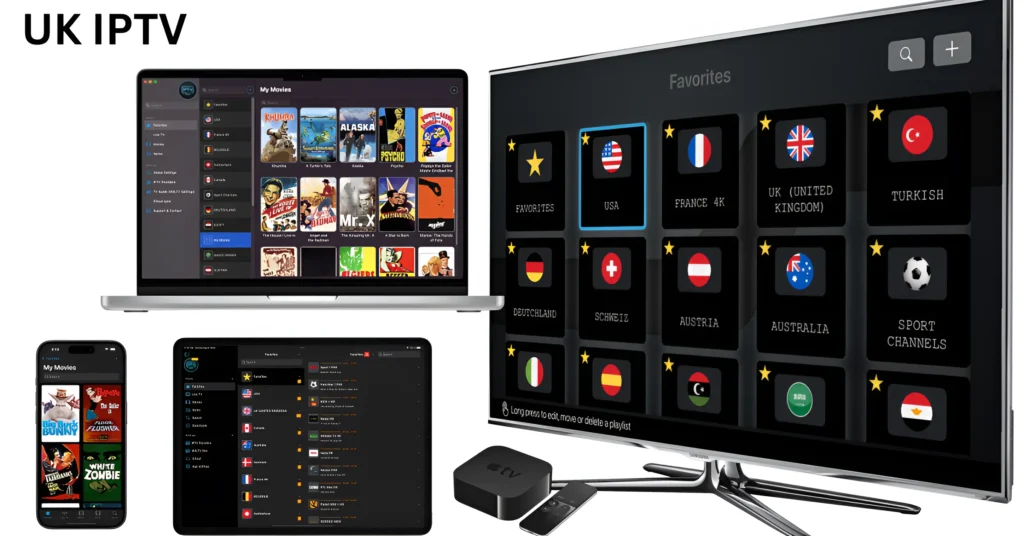
Because customers may frequently customize their channel selection and services to suit their own requirements, IPTV encourages a user-centric approach to viewing. Compared to traditional television services, which usually follow a fixed package model, this degree of customisation is a major advantage. In addition to improving the watching experience, IPTV meets the increasing need for individualized entertainment solutions by providing a vast array of content and distribution options. Because of these factors, people who want to improve their television experience and adopt contemporary viewing habits must know how to set up IPTV on Windows and Mac.
Setup Instructions for IPTV
Certain hardware and software requirements must be met in order to set up UK IPTV on Windows and Mac and guarantee a flawless streaming experience. The needs for the computer system should be taken into account first. Although 8GB or more is advised for better multitasking capabilities, a device with at least 4GB of RAM is advised for maximum performance. Having enough storage space is also essential; 500MB or more should be accessible for the installation of temporary files and other apps. IPTV providers will stream more smoothly with a recent processor, ideally an Intel i3 or similar.
The internet connection is equally crucial because uninterrupted IPTV streaming on Mac and Windows requires a steady, fast connection. For standard definition (SD) and high definition (HD) material, a minimum internet connection of 10 Mbps and 25 Mbps, respectively, is advised. For more reliability over Wi-Fi, users should also think about utilizing a wired Ethernet connection, especially in homes where several devices are linked to the same network.
Setting Up IPTV on Windows using IPTV Smarters Pro
To guarantee a seamless installation and configuration procedure, go to following detailed steps for configuring IPTV on Windows using IPTV Smarters Pro. The first step is to download the IPTV Smarters Pro app.. To get the installer, go to the official IPTV Smarters website or a reliable software source. Find the installer in your downloads folder and double-click it to launch the setup procedure when the download is finish.
Locate the IPTV Smarters Pro shortcut icon on your desktop or look for it in your Start menu to start it up after installation. You will be present with an easy-to-use interface when you first launch the application. You may start entering your IPTV subscription information by clicking on “Add User” or “Log in with Xtream Codes API.” Your login, password, and the server URL that your IPTV service provides are among the details you will need to enter.
Way to Use IBO Player to Setup IPTV for a Mac
The first important step in configuring IPTV UK on a Mac using IBO Player is downloading and installing the program. To finish the installation procedure after downloading, launch the installer and adhere to the on-screen directions. Open IBO Player from your programs folder after installation.
You will be met with an intuitive interface that is made for simple navigation when you launch IBO Player. The app may ask you to set up your IPTV access at first. You must input your membership information, including the M3U or Xtreme Codes URL that your IPTV service provider has supplied, in order to accomplish this. To guarantee accurate input, find this information in the email or account dashboard that your provider provides.
Typical Problems and Solutions
Users may run into a number of frequent problems when configuring IPTV on Mac or Windows, which might interfere with their viewing experience. For IPTV services to integrate seamlessly, these issues must be recognize and fixed. Users commonly report connection failures, which are typically cause by insufficient network settings or compatibility problems. Make sure your internet connection is steady and satisfies the minimum bandwidth requirements set by your Best IPTV provider in order to lessen this. You may evaluate the performance of your network using a speed test.
Another common problem is buffering, which usually arises as a result of excessive server traffic or sluggish internet rates. If you frequently have buffering when using IPTV on a Mac or Windows computer, you could want to reduce the video quality settings in the application. Additionally, streaming speed can be improved by shutting off other bandwidth-consuming apps. It’s also a good idea to regularly check your device for software upgrades, since they might improve speed and reduce latency.
It’s a smart idea to contact your IPTV provider customer service if issues persist after troubleshooting. They are able to offer particular advice based on their service. Users may improve their overall watching experience by successfully resolving IPTV-related problems on Windows or Mac by following these instructions. Keep in mind that comprehensive troubleshooting can frequently restore your IPTV experience.
Additional Windows and Mac IPTV Apps
Although IPTV Smarters Pro and IBO Player are well-like options for IPTV service access. Users on the Mac and Windows platforms have a number of other options. These applications are valuable choices for streaming material since they provide distinctive features that might satisfy various user needs and preferences.
A popular and adaptable media player that supports a variety of formats, including IPTV feeds, is VLC Media Player. Because of its powerful streaming features, users may launch network broadcasts by just inputting the IPTV link. VLC is a great alternative for people who like control and personalization over their watching experience because it also provides robust playback settings.
Improving Your Experience Using IPTV
Users may utilize a number of techniques to maximize their watching experience in order to get the most out of IPTV on Mac and Windows. Priority one should be given to making sure you have a steady and quick internet connection. For smooth streaming, a broadband connection with a minimum speed of 10 Mbps is usually advise. Instead of using Wi-Fi, users might think about connecting directly over Ethernet, which can lower latency and increase streaming reliability.
Changing the network settings is another efficient method of improving 4K IPTV on Mac and Windows. IPTV traffic may be prioritize and given enough bandwidth by using your router’s Quality of Service (QoS) settings. To lessen any possible lags, think about turning off any unneeded devices from the network when streaming.
Finally, investigating other content providers can give IPTV users on Mac and Windows even more choices. It’s possible that many consumers are unaware that third-party plugins or add-ons improve the viewing experience by providing access to material beyond what is naturally available. Users can experience a more varied and fulfilling streaming experience by incorporating these recommendations into their IPTV configurations.
Legal Aspects for IPTV Subscribers
Customers looking for a variety of television alternatives are increasingly using British IPTV services. When configuring IPTV on a Mac or Windows computer, users need to be mindful of the important legal implications that accompany this growth. The legality of the content being seen is greatly influence by the reputation of the IPTV subscription service provider.
Selecting a trustworthy IPTV free trail provider is crucial. Numerous companies guarantee adherence to international norms and copyright laws by offering licensed material. To ensure that they have the appropriate licensing rights for the channels and material being provided. Users should do extensive research on the provider they have selected. Unauthorized use of IPTV services might result in a number of legal problems. include possible penalties or lawsuits brought by content owners. Many nations treat copyright infringement seriously, and users who access or re-distribute unauthorized broadcasts risk legal repercussions.
Users of IPTV UK are thus urge to make use of providers that support openness. Offer clear details on their content licensing. By doing thus, people assist content producers and the expansion of the business in addition to shielding themselves from potential legal repercussions. In summary, IPTV services are unquestionably appealing. To guarantee a responsible watching experience, users should give legal compliance top priority..
User Opinions and Experiences
User evaluations offer important information about how to use IPTV on Mac and Windows. Numerous users praise these systems for their simplicity and versatility. The simplicity of accessibility and installation is a recurring topic among happy customers. One customer wrote, for example, “I can now watch my favorite channels without the hassle of traditional setups, and setting up IPTV UK on my Windows PC was a breeze.” Several testimonies that emphasize the availability of a large number of channels on desktop computers support this opinion.
The affordability of IPTV subscriptions in comparison to cable services is another benefit mention by customers. Many discover that they may access a multitude of leisure content with simply a reliable internet connection. One customer commented, “Since I switched to IPTV on Windows, I’ve saved a ton on my entertainment budget.” There is really no comparison to the diversity. But there are drawbacks to this change. Concerns over customer service and the dependability of specific IPTV service providers were voiced by several consumers.
Overall, comments on best iptv providers on Mac and Windows show a mix of difficulties and happiness. Users’ experiences show an increasing trend of using these platforms. Obtain television programs more easily and frequently at a lower cost. In the end, each person’s experience will be determine by the service they choose and their own configuration.
Another IPTV website in the UK IPTV.
The greatest choice for premium IPTV subscriptions is UK IPTV. Enjoy convenient access to an extensive selection of HD live and on-demand channels. Our reliable streaming and top-notch customer support are perfect for any entertainment enthusiast. No matter what they decide—international movies, sports, or shows. Find out more about our objectives and maximize your TV experience!
Conclusion
We have covered all of the many facets of configuring IPTV on Mac and Windows in this article. This way of watching TV is becoming more. More common because of its price, versatility, and wide selection of channels. Users may enjoy a smooth and varied watching experience without the conventional limitations of cable television by using IPTV on Windows or Mac.
As we wrap up this lesson, we strongly advise you to begin installing IPTV on your device. Please use the comments area below to ask any queries or to share your experiences. Interacting with other users can improve your comprehension of the platforms and yield insightful information. We value your engagement and input since it helps create a community of knowledgeable viewers looking at the top IPTV choices.